
Bigcommerce + POS Integration

Seamless Synchronization for Your Retail Business
- Seamless near real-time sync between your Point of Sale (POS) system and BigCommerce.
- Automatic updates of product catalog, inventory, pricing, and orders to ensure consistency across platforms.
- Eliminates manual data entry, reducing the risk of human error and saving valuable time.
- Improves operational efficiency with smooth, automated workflows.
- Enhances customer experience by ensuring accurate stock levels and pricing information online.

Compatible with Leading POS Systems
- Integrates seamlessly with a wide variety of retail management systems used across the industry.
- Supports multiple retail verticals, including fashion, electronics, home goods, sports, liquor and specialty stores.
- Scalable for businesses of all sizes, from single-store operations to large retail chains.
- Improves inventory accuracy and minimizes stock discrepancies across platforms.
- Easy to migrate if your retail system changes, ensuring long-term flexibility and minimal disruption during transitions.
Multi-Store Integration with BigCommerce
- Connects multi-store retail chains with BigCommerce for seamless eCommerce integration.
- Synchronizes product catalogs, inventory, pricing, and orders across all store locations in near real-time.
- Enables BOPIS (Buy Online, Pick Up In-Store) functionality, offering customers the option to pick up orders from their nearest store.
- Automatically routes online orders to the nearest store location based on customer’s address or product availability, ensuring faster fulfillment.
- Reduces shipping costs and delivery times by leveraging in-store pickups.

Let Your POS Talk to BigCommerce – No Manual Uploads, Just Instant Sync
Ideal for growing retailers, multi-store chains, and omnichannel businesses seeking seamless operations and smarter inventory control.
Why Choose Octopus Bridge for BigCommerce Integration?
✅ Seamless Two-Way Sync
Automatically update product details, pricing, and stock levels across your POS and BigCommerce store in real time.
✅ Effortless Order Management
Orders placed on BigCommerce are instantly reflected in your POS, eliminating manual entry and reducing errors.
✅ Multi-Location Support
Manage inventory across multiple stores and warehouses while ensuring accurate stock availability.
✅ Compatible with Leading POS Systems
Octopus Bridge integrates with almost any retail POS system in the industry. See the list of supported POS systems here.
✅ Cloud-Based & Secure
Octopus Bridge is a secure, cloud-based SaaS platform that ensures reliable and scalable retail integration.
✅ Expert Support
Our team ensures seamless migration, effortless setup and ongoing support for your retail business.
How our integration works?
24Seven Commerce – Overview
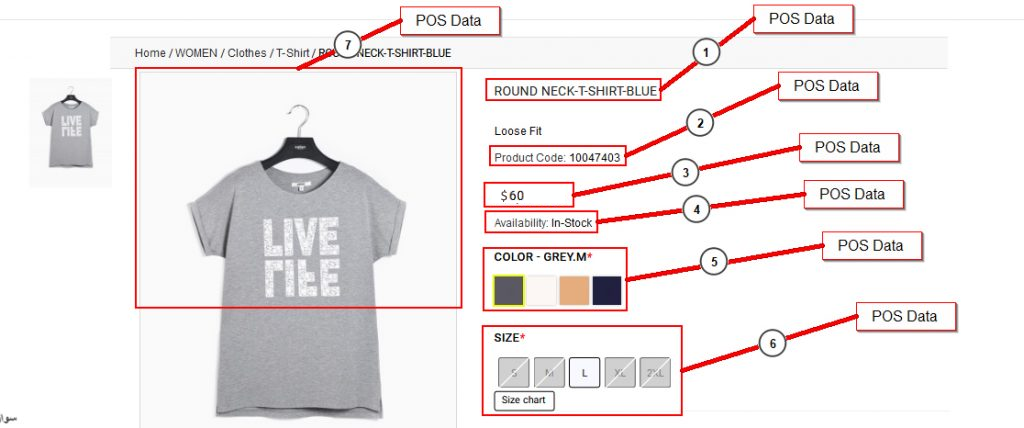
Product Information Uploads from POS to BigCommerce
SKU, UPC, Product Title, Description, Long Description, Dept. & Categories, Price (with Tax or without Tax), Sale Price, Cost, Attributes and Variations (Size, Color, Range, Dimension), Stock, Main Product Image, Additional Images.
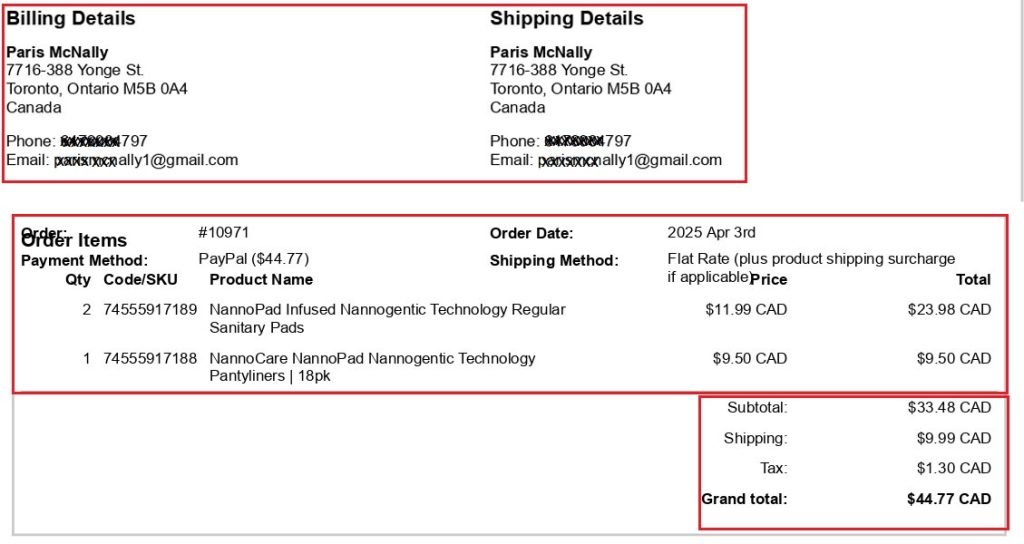
Order Information Download from BigCommerce to POS
Order Number, Customer’s ‘Bill To’ Name & Address, ‘Ship To’ Name & Address, Email, Phone #, Item Name, Ordered Quantity, Item Unit Price, Sub Total Price, Discount, Tax, Shipping Charges, Grand Total.
Data Synchronization between Bigcommerce and POS
Upload from POS to Bigcommerce:
- Item SKU
- Item name
- Category/Department Name
- Manufacturer
- Description
- Image
- Price – Retail, Price Level A/B/C
- Sales price
- Color
- Size
- Quantity
- Style Matrix
Download from Bigcommerce to POS:
- Customer Bill To name
- Bill to and Ship to Addresses
- Customer Ship To Name
- Email address
- Phone Number
- Shipping method
- Item code
- Item quantity
- Item Price
- Discount Amount
- Tax
- Order number