Imagine a customer falls in love with a product in your store and checks your website that night to buy a second one. The page takes forever to load. The product isn’t even listed, because your site hasn’t been updated in months. Or worse, it says “in stock,” and two days later you’re emailing an apology because you’re actually sold out.
That customer doesn’t blame your inventory process. They blame you.
This happens every day to independent and multi-location retailers. Not because anyone did anything wrong, but because the business kept growing and the website didn’t grow with it.
Over the years, we’ve worked with retailers ranging from single-store businesses to multi-location chains using POS systems like Retail Pro, Lightspeed, RMH, CounterPoint, and others. The underlying challenges are almost always the same. This guide walks through what’s actually going wrong, what to fix first, and what a smart revamp looks like.
Before You Spend More on Marketing, Fix Your Website
If your website isn’t working well, marketing just sends more people to watch it not work.

- Google Ads won’t fix a slow website.A six-second load time loses visitors before they see a product.
- SEO won’t help if your site structure is poor. Ranking on page one doesn’t matter if visitors can’t find what they came for.
- Facebook and Instagram ads won’t convert if checkout is frustrating. A clunky checkout quietly cancels out the money you spent getting someone there.
- A redesign often beats increased ad spend, because it improves what you get from traffic you’re already paying for or already earning.
Marketing gets people to your door. Your website decides whether they walk in or turn around. Most retailers who think they have a traffic problem actually have a conversion problem, and more traffic doesn’t fix that.
Why Retail Websites Stop Supporting Business Growth
Most retail websites aren’t built badly. They’re built for a moment in time, and the business keeps moving while the website stays still.
Common causes:
- A second or third location opens, but the site was designed for one store.
- The POS gets upgraded, but the website integration never gets revisited.
- The catalog grows, but navigation was built for a much smaller one.
- Staff turn over, and whoever understood the backend leaves nothing documented.
- A “redesign” happens, but it’s cosmetic only, inventory and backend structure untouched.
Sarah’s story is one we hear constantly. She owns a gift shop with two locations. Every Friday, she spends two hours manually syncing stock counts between her POS and her website. It doesn’t help on Saturday: when one store sells out of a candle, the site still shows it in stock until the next update. Customers order it anyway, and Sunday nights become apology-email nights.
After connecting her POS to her website during a redesign, that ritual disappeared. Inventory updates automatically now, whether a candle sells in-store or online. Sarah got her Fridays back and stopped starting weekends with refunds.
Watch for these signs that your own site may be holding you back:
- Website inventory doesn’t match what’s actually in the store, leading to orders you can’t fulfill.
- Someone manually updates products or prices after changing them in your POS, which eats staff hours every week.
- The site looks fine on desktop but feels clunky on a phone, even though most shoppers are browsing on one.
- Cart abandonment is higher than it should be, often a sign checkout is asking for more than it needs to.
- New products take days to appear online after arriving in-store, so you’re losing early sales on new arrivals.
- Search on your own site is unreliable, so customers give up rather than dig through pages of results.
If a few of these sound familiar, your site probably isn’t broken. It’s just due for a check-up.
Is Your Website Helping or Hurting Your Business?
Take two minutes and score your site honestly.
| Question | Yes | No |
| Is your site fast on mobile (under 3 seconds)? | ☐ | ☐ |
| Does inventory automatically match your POS? | ☐ | ☐ |
| Can customers filter and search products easily? | ☐ | ☐ |
| Does your site rank for the searches you care about? | ☐ | ☐ |
| Is checkout quick, with minimal required fields? | ☐ | ☐ |
| Do you offer buy-online-pickup-in-store (BOPIS)? | ☐ | ☐ |
| Do you have analytics you actually check? | ☐ | ☐ |
| Has your site had an SEO review in the last year? | ☐ | ☐ |
Three or more “No” answers usually means your site is creating more manual work and lost sales than you realize. That doesn’t mean starting over, it usually means a handful of specific fixes.
Why Your Website Should Work With Your POS, Not Separately
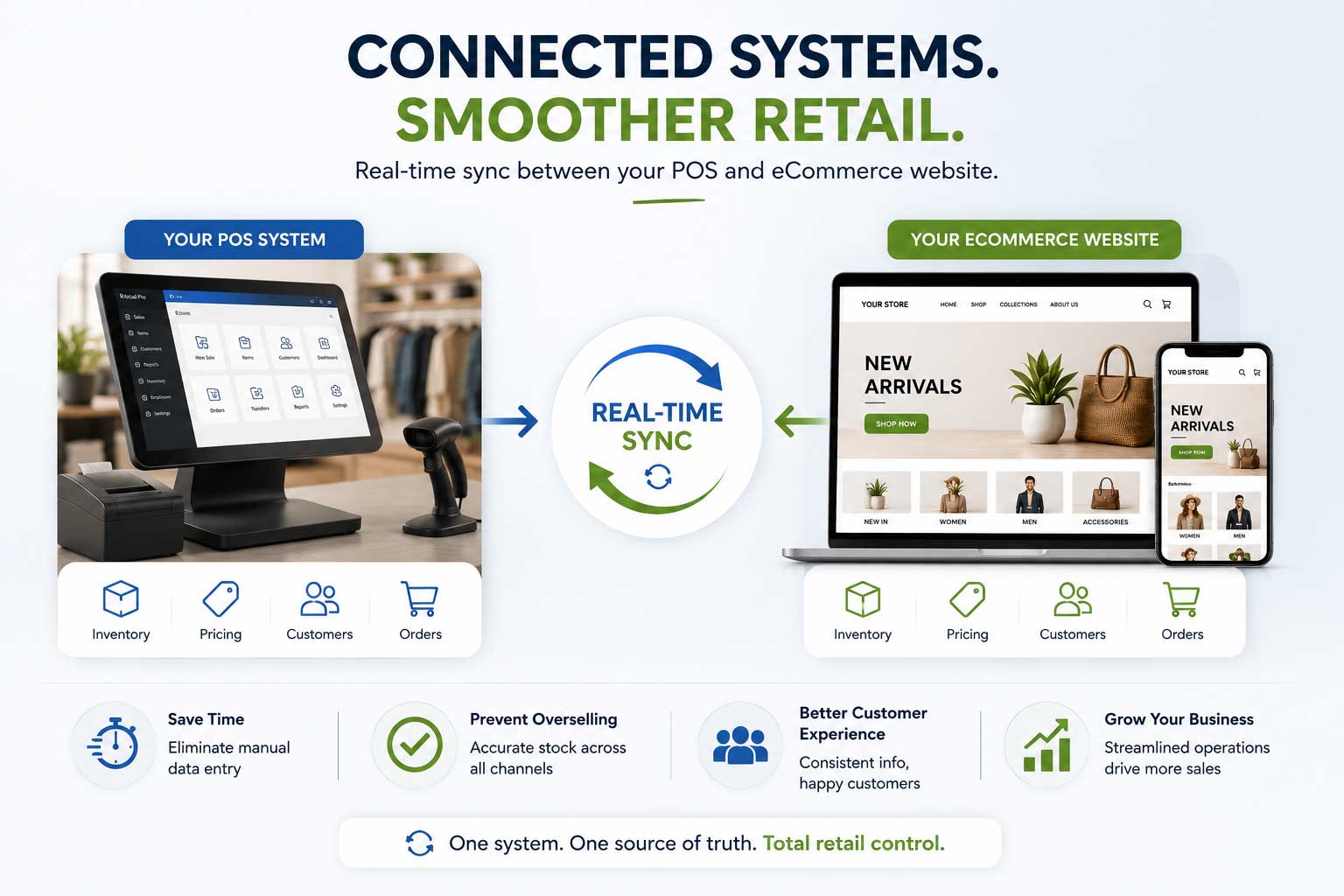
This is the most overlooked part of a retail website, and the one that causes the most ongoing pain.
Many sites are built as if they exist in a vacuum: someone connects a payment processor and calls it done, while the POS running your actual store, inventory, sales, customers, operates completely separately. The result is two systems that don’t talk, and a staff member stuck syncing them by hand, like Sarah was.
| Task | Manual Process | POS-Integrated Website |
| Stock levels | Staff edits counts after in-store sales | Updates automatically, both directions |
| New products | Entered separately in POS and website | Syncs from POS, no duplicate entry |
| Online orders | Re-entered into POS by hand | Flows directly into POS for fulfillment |
| Customer records | Separate databases per channel | One profile across both channels |
| Pricing | Changed in two places, risk of mismatch | One update reflects everywhere |
| Order accuracy | Higher risk of overselling | Real-time stock prevents overselling |
The payoff: fewer manual hours, fewer overselling mistakes, and a customer experience that actually matches what’s on your shelves. Details vary by system, a Lightspeed integration behaves differently than a Retail Pro or CounterPoint one, so it’s worth getting this piece right rather than treating it as an afterthought.
What the Numbers Actually Look Like
Retailers often think of a redesign purely as a cost. It’s worth thinking of it as a return instead.
Say your site gets 5,000 visitors a month. At a 1.2% conversion rate, that’s roughly 60 orders. If a redesign, faster load, cleaner checkout, better mobile, lifts conversion to 2.0%, you’re now generating about 100 orders a month from the same traffic, without spending another ad dollar.
The same logic applies to POS sync. If manual inventory work costs two hours a week, that’s over 100 hours a year, plus the cost of refunds from overselling. The math usually favors fixing the system over continuing to work around it.
Features Every Modern Retail Website Should Include
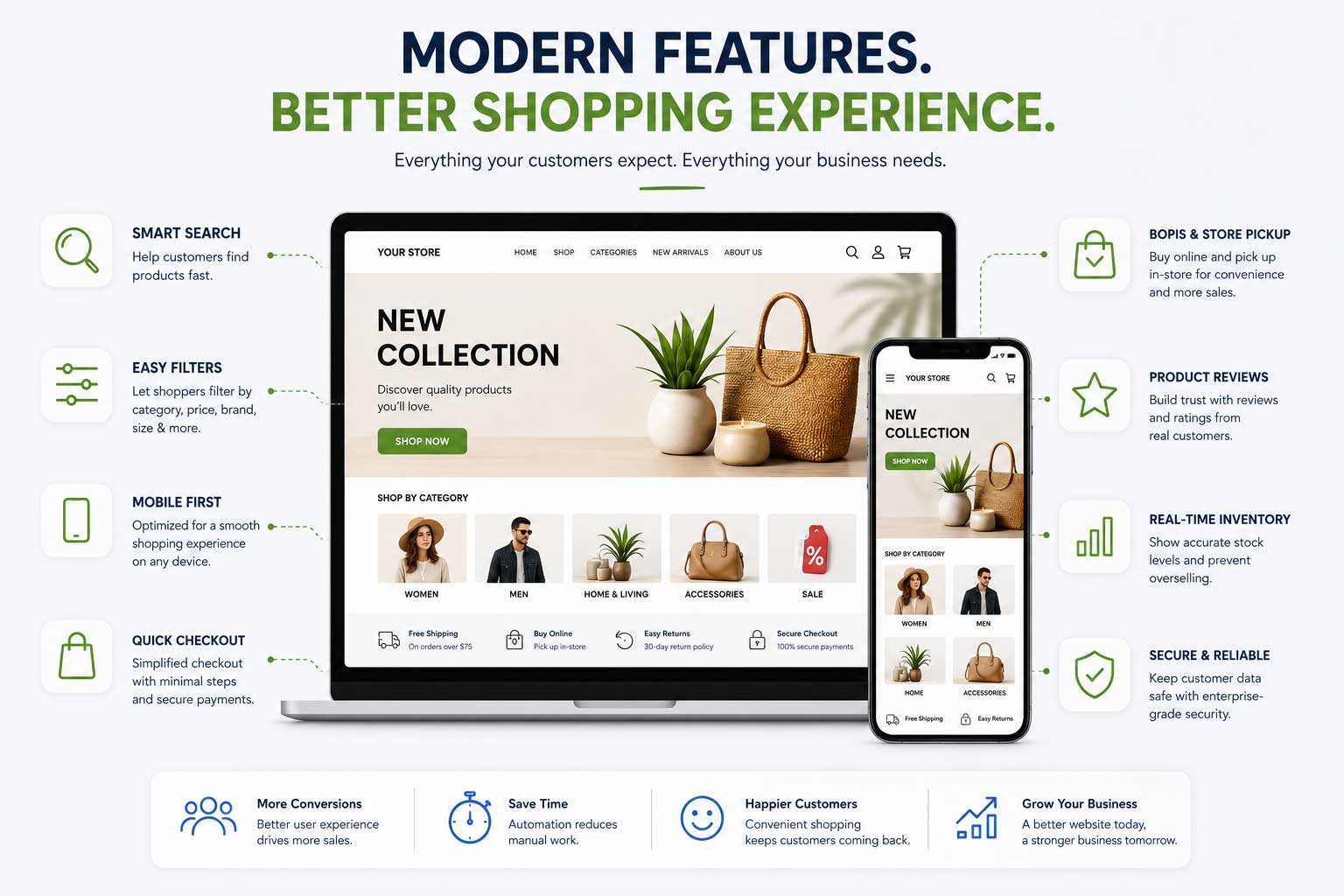
A modern site doesn’t need every feature. It needs the right ones, done well, and each one earns its place for a specific reason.
- Mobile experience — most traffic arrives on a phone; a desktop-first design is already behind, no matter how good it looks on a laptop.
- Speed — every extra second of load time costs you visitors before they see a product, regardless of how good that product is.
- Search and filtering — customers narrowing by size, brand, or price expect quick results; a weak search sends them straight to a competitor’s site instead.
- Reviews — build trust for products a customer can’t hold in person, and add fresh content that helps SEO without any extra writing on your part.
- Checkout — fewer steps and fields means fewer abandoned carts; every optional field you can remove is one less reason to give up.
- Store locator and BOPIS — bridge your online and physical presence, one of the most requested features for local retailers right now.
- Gift cards and loyalty — work consistently across in-store and online so repeat customers are rewarded no matter how they shop.
- Analytics — without visibility into what’s working, you’re running the store with the lights off, guessing instead of knowing.
| Old Website | Modern Website |
| Slow | Fast |
| Manual updates | Automatic sync |
| Desktop-first | Mobile-first |
| Poor SEO | SEO optimized |
| Basic search | Smart search |
| Manual inventory | Near Real-time inventory |
| Limited checkout | Streamlined checkout |
| No analytics | Data-driven insights |
SEO Starts With Website Structure
SEO isn’t just keywords and blog posts. It starts with structure.
- Site architecture. A flat, logical path (Home > Category > Subcategory > Product) beats a confusing one, for customers and search engines alike.
- Categories. Overlapping categories, like “Men’s Jackets” and “Outerwear” as separate listings, make you compete against yourself in search results.
- URLs. Clean, readable URLs (/mens-jackets/winter-parkas) outperform strings of numbers and parameters.
- Speed. Search engines factor load time into rankings, so a slow site is an SEO problem, not just a UX one.
- Schema. Structured data helps search engines show rich results, star ratings, stock status, directly in listings.
- Internal linking. Related products and categories linked to each other help both customers and search engines navigate your catalog.
- Image optimization. Compressed images with descriptive alt text load faster and index better.
| Element | Poor Structure | Strong Structure |
| URLs | /product?id=8832&cat=12 | /mens-shoes/running-sneakers |
| Categories | Overlapping, duplicated | Clear, distinct |
| Internal Links | Few or none | Related items linked naturally |
| Images | Unoptimized, no alt text | Compressed, descriptive alt text |
| Schema | None | Product, price, availability present |
Speed deserves a special callout here: even a one-second delay in load time measurably hurts conversions, and pages loading in under two to three seconds consistently outperform slower ones. A visitor who clicks an ad or a search result and waits six seconds on a slow mobile page usually leaves before they ever see your product, and you never see that loss in your analytics. It just looks like the ad underperformed.
Common Mistakes Retailers Make During a Website Redesign
We see the same handful of mistakes repeatedly:
- Focusing entirely on design, treating inventory sync and backend structure as an afterthought, then wondering why the new site still causes the same headaches.
- Migrating content without checking SEO impact, tanking rankings that took years to build in the process.
- Choosing a platform based on a flashy demo instead of how the business actually operates day to day.
- Skipping mobile testing, reviewing only on a desktop monitor and missing problems most customers will actually hit.
- Leaving out the staff who use the POS daily, creating workflow gaps nobody catches until after launch.
- Launching without analytics set up first, so there’s no “before” baseline to measure the redesign against.
- Underestimating migration time for larger catalogs, which pushes launch dates and rushes quality checks.
- Treating the redesign as a one-time project instead of planning for ongoing maintenance afterward.
Most of these aren’t about bad intentions. A redesign touches more of the business than people expect going in.
What You Keep During a Revamp
The biggest hesitation retailers have about a redesign is fear of losing everything they’ve built. Done properly, a revamp preserves:
- Your domain — no address change needed.
- Your Google rankings — protected with proper redirects from old URLs to new ones.
- Your product catalog — migrated, not rebuilt from scratch.
- Customer accounts and order history — where the platform supports it.
- Your brand identity — logo, colors, tone.
- Your POS system — a revamp connects to what you already use; it doesn’t require switching providers.
- Existing content — blog posts and pages that already perform well.
A redesign is closer to a renovation than a demolition. The goal is to keep what works and fix what doesn’t.
What a Website Revamp Process Actually Looks Like
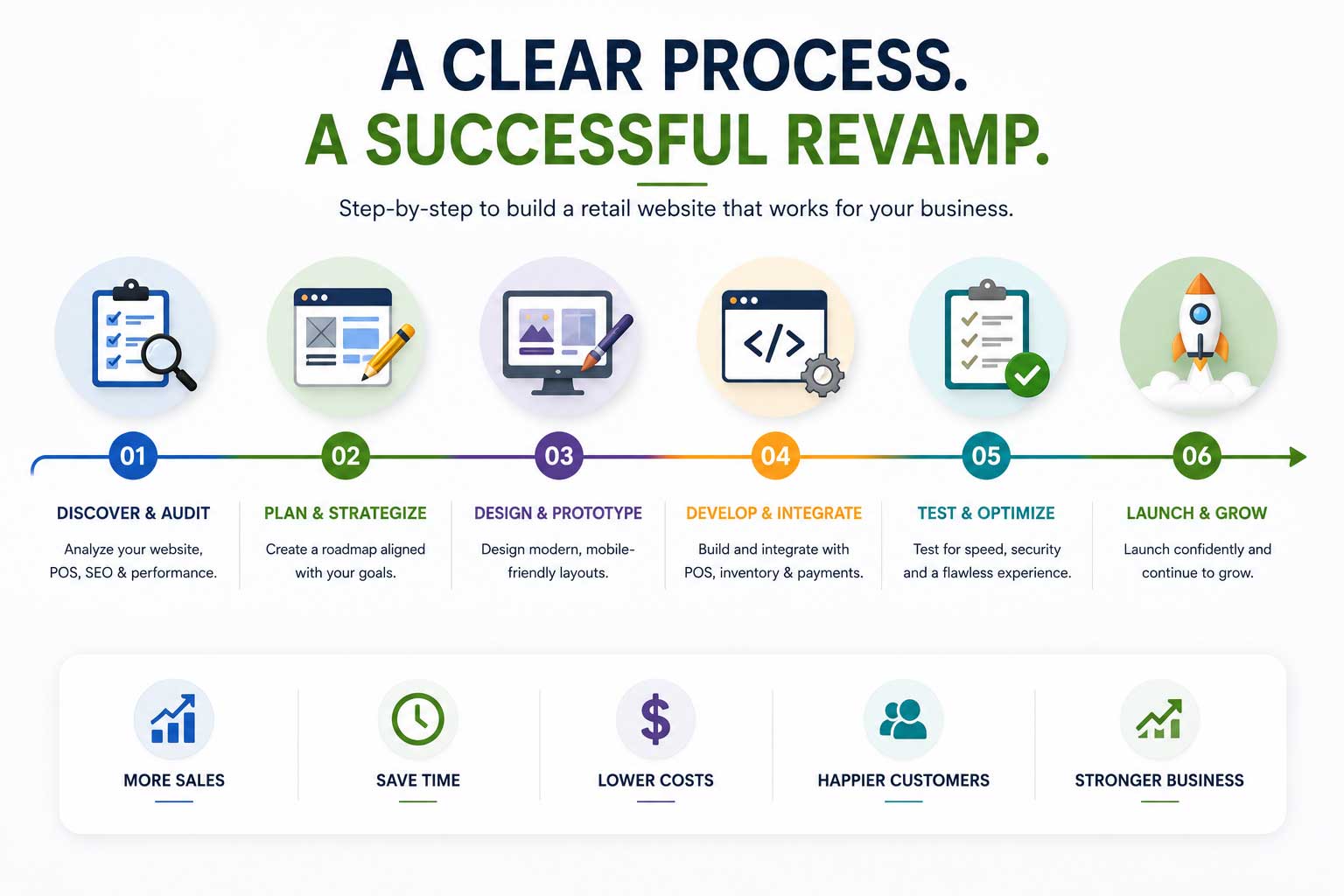
Uncertainty about “what actually happens” is one of the biggest reasons retailers delay a redesign. In practice, it follows a fairly consistent sequence:
- Audit — understand what’s working and what isn’t.
- UX and SEO review — how customers move through the site today, and what’s currently ranking.
- Platform and POS review — confirm the platform fits, and map exactly how inventory, orders, and customers need to sync.
- Wireframes and design — rough layouts first, then the visual design built on that structure.
- Development and migration — build the site and POS integration, then move products, content, and customer data carefully.
- Testing and launch — check functionality, speed, and mobile experience, then go live with redirects in place.
- Support — ongoing maintenance, since a website is never really “finished.”
Before starting, run through this checklist:
- [ ] Is inventory synced between POS and website, or updated manually?
- [ ] How does the site perform on mobile specifically?
- [ ] What’s the current page load time?
- [ ] Do product URLs and categories make logical sense?
- [ ] Is schema markup implemented?
- [ ] How many steps does checkout require?
- [ ] Do you have analytics, and do you check it regularly?
- [ ] Does the current platform support what you actually need (BOPIS, gift cards, loyalty)?
A few things make the difference between a smooth revamp and a stressful one:
- Define success upfront. Faster load times? Fewer manual inventory corrections? Getting specific shapes every decision after it.
- Map POS requirements before choosing a platform, not after. Retrofitting integration onto a finished design is harder than building it in from the start.
- Set a realistic migration timeline. Larger catalogs take longer to move cleanly, and rushing is where SEO and product-data errors creep in.
- Test on mobile throughout, not just at the end. Catching issues early is far cheaper than fixing them post-launch.
- Train staff on new workflows, especially around order fulfillment, before launch day, not after.
Frequently Asked Questions
How do I know if I need a full redesign or just updates? Start with an audit. If the core issues are inventory syncing or SEO structure, targeted updates may solve it without a full rebuild.
Will a redesign hurt my current SEO rankings? It can, if URLs and redirects aren’t handled carefully. A proper plan maps old URLs to new ones and preserves content that’s already ranking.
How long does a typical revamp take? Anywhere from a few weeks for smaller sites to a few months for larger, multi-location catalogs.
Can my website sync with my POS automatically? Yes, for most major systems, including Lightspeed, Retail Pro, CounterPoint, and RMH, with the right integration in place.
What happens to online orders if my site isn’t connected to my POS? Someone has to manually re-enter them, which adds labor and risk of error.
Do I need a mobile app, or is a mobile-friendly site enough? For most independent and multi-location retailers, a well-built mobile-friendly site covers the need without the cost of a separate app.
What’s the difference between a redesign and a migration? A redesign focuses on look, feel, and functionality. A migration moves your existing site and data to a new platform or host. Many projects involve both.
Can BOPIS really help a smaller retailer? Yes. It’s one of the most requested features by local shoppers, and it plays to a strength larger online-only retailers can’t easily match.
Is syncing my website with my POS expensive? Cost varies by POS and platform combination, but the savings in reduced manual work and fewer inventory errors often offset the investment over time.
Will I need to retrain my whole staff after a revamp? Usually just the people who touch order fulfillment and inventory. If the integration is set up well, day-to-day tasks often get simpler, not harder.
Can I revamp my website without switching my POS system? Yes. Most revamps connect to the POS you already use rather than requiring a switch, unless your current POS genuinely can’t support what your business needs going forward.
Conclusion
Your website is often the first employee customers interact with. It answers questions, showcases products, processes orders, and represents your brand around the clock.
If it’s outdated, slow, or disconnected from your operations, it’s probably creating more work than it saves, quietly, in ways that are easy to miss until you add them up.
The good news: you don’t always need to start from scratch. The right improvements in the right places can change how your website supports your business, often faster and cheaper than a full rebuild.
Every retail business is different, and so is every website. That’s why the best place to start isn’t with a redesign, it’s with an honest assessment of what’s working and what isn’t. A professional website audit can identify opportunities to improve performance, SEO, customer experience, inventory management, and POS integration without making unnecessary changes.
Whether you need a few strategic improvements or a complete revamp, understanding your current website is the first step toward one that grows with your retail business.